Operations
Runtime tools for checking Compass: debug, health, metrics, logs, and troubleshooting.
Runtime endpoints
The operator-facing endpoints are /debug, /health, /metrics, and
/api/services. The dashboard, service detail pages, markdown pages, static
assets, and manifest are normal UI routes covered in Getting Started
and Pages.
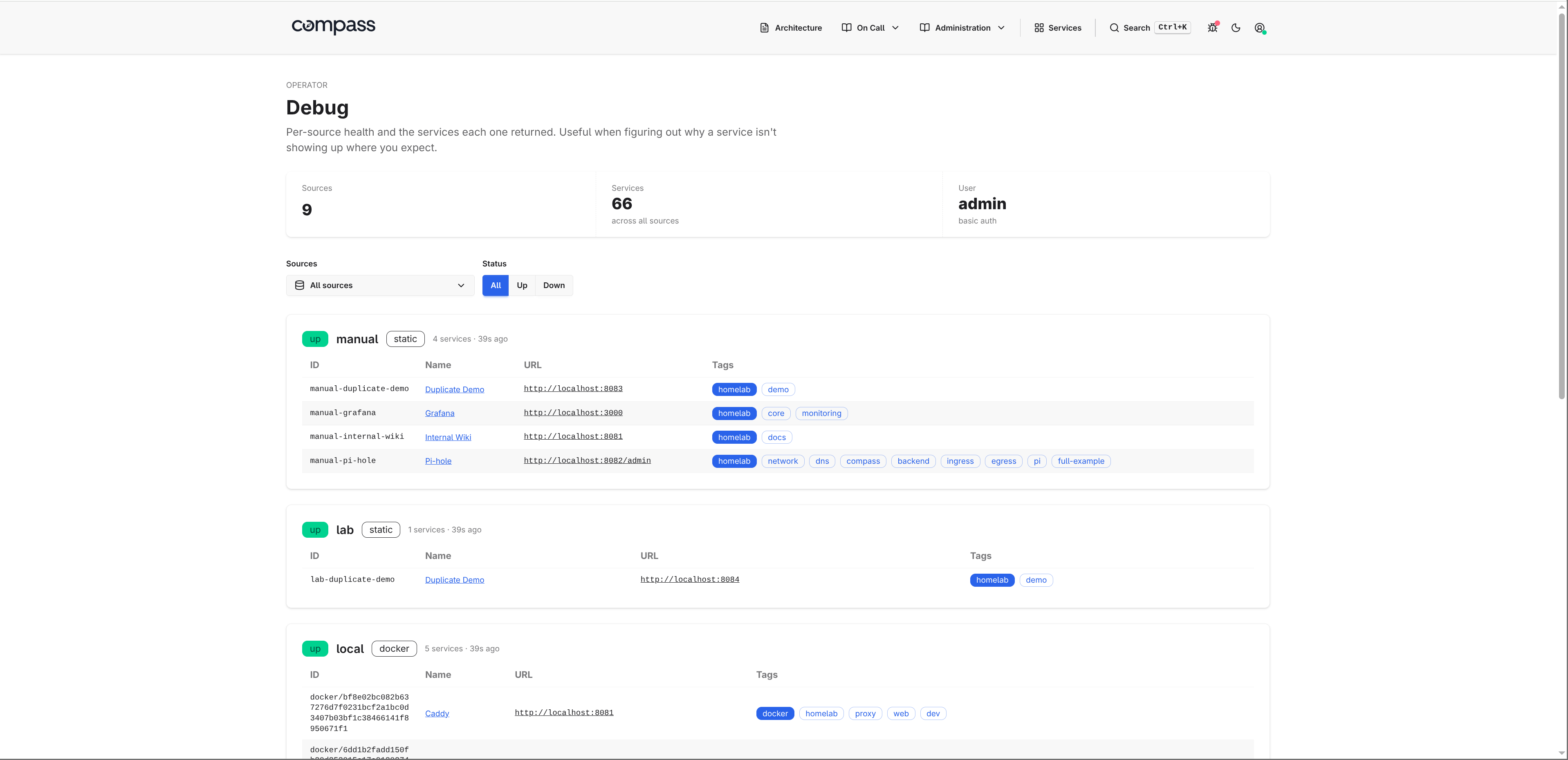
/debug
A per-source health view. For every configured source it shows a
status badge (ok / error / pending), the service count and last
load time, the discovery output as a table, and the error message when
the last refresh failed. Published services include a Why included
section that explains registry decisions such as URL normalization, generated
IDs, catalog backfills, and invalid link or panel removal. Dropped services
show the validation or filter reason that removed them.
The navbar bug icon shows a small red dot whenever any source's last
load reported an error, so you don't have to keep /debug open to know
something is unhealthy.
On by default. Set debug.enabled: false in compass.yaml to suppress
the route. Any request to /debug then returns 404.
/health
Liveness endpoint for load balancers and orchestrators. Returns HTTP 200
with {"status":"ok"} and is unauthenticated regardless of the configured
auth mode.
/api/services
GET /api/services returns the current normalized service registry as JSON:
{
  "services": [
    {
      "id": "static-manual-grafana",
      "name": "Grafana",
      "url": "https://grafana.example.com",
      "source": "manual",
      "source_type": "static",
      "tags": ["monitoring"]
    }
  ]
}
The endpoint uses normal Compass authentication and source access rules. It
returns only services visible to the current caller, and it does not expose
dropped services or raw source credentials. Responses use Cache-Control:
no-store because discovery data can change between refreshes.
/metrics
Prometheus exposition format. Default scrape config is fine; the endpoint is unauthenticated regardless of the configured auth mode so scrapers don't need credentials.
| Metric | Type | Labels |
|---|---|---|
compass_http_requests_total |
counter | route, method, status |
compass_http_request_duration_seconds |
histogram | route |
compass_source_refresh_total |
counter | source, outcome (success|error) |
compass_source_refresh_duration_seconds |
histogram | source |
compass_source_services |
gauge | source |
compass_source_last_success_timestamp_seconds |
gauge | source |
The source label uses Compass's canonical <type>/<name> source identity,
for example kubernetes/cluster.
last_success_timestamp_seconds is the Unix time of the most recent
successful refresh. Pair with time() for stale-source alerting:
A ServiceMonitor for prometheus-operator ships with the Helm chart;
enable it with serviceMonitor.enabled: true.
Logs
Every HTTP request emits one structured log line: method, path, status,
byte count, duration, and remote address. Source refresh outcomes log
here too. /health, /static/*, and /metrics log at debug to keep
probe and scrape traffic quiet; everything else logs at info. 5xx
responses always log at error.
Configure the format and level in compass.yaml under
logging:.
Troubleshooting
Compass exposes three places to check when something looks wrong:
/debug: per-source status, service counts, last successful load time, raw source errors, and the discovered service table./metrics: scrapeable source refresh counters, refresh duration, service counts, and last-success timestamps.- Logs: startup validation errors, source refresh outcomes, HTTP requests, and 5xx responses.
Source identities use <type>/<name>, for example kubernetes/cluster. Use
that value to match a source across /debug, metrics labels, and logs.
Compass Will Not Start
Config errors are printed during startup and include the field that failed validation. For the full config reference, see Configuration.